
Discover the tools that make teaching, grading, and managing computer applications courses easier.
Compugrade brings lessons, automatic grading, student feedback, and course management together in one platform. Teachers can assign lessons and monitor student progress—all without the time-consuming manual grading that traditionally comes with teaching computer applications.

Automatic grading, instant scoring, and a robust LMS dashboard give you back your evenings. Easily assign, track progress, generate reports, and manage your entire class — all in one place.

Immediate feedback while concepts are fresh. The visual document analyzer lets students self-correct in real time, turning mistakes into powerful learning moments instead of frustration.

Rich interactive lessons with embedded master videos and inline how-to guidance. Students stay focused and motivated because everything happens inside the familiar Microsoft or Google environment.

Courses aligned to Microsoft Office Specialist (MOS) exams with built-in practice and preparation — helping your students earn industry-recognized credentials.

Lessons, assessments, and all learning tools are contained inside the Microsoft and Google applications. There's no need for textbooks, switching tabs or screens, logging in to a third party LMS, or downloading files.
Compugrade brings lessons, instructions, practice files, and assessments directly into Microsoft Word, Excel, and PowerPoint. Students can access everything they need and complete their work without switching between applications, opening separate textbooks, or navigating multiple browser tabs.
The amazing content you've grown to love from B.E. Publishing is embeded inside of the Add-in panel. No textbooks/eBooks or switching screens.
A real-time grading feature that checks if students performed a task and skill properly.
Students compare their work to that of the answer key in real-time. Meaning, a student can view their document at any step in a lesson to see if they are on the right track.
Students navigate through course lessons, set up using a modern style, interactive table of contents.
Every lesson is introduced with an instructional video, and these videos are also embedded and segmented at the task level, allowing students to watch video clips specific to the task and skill they are working on.
No more worrying about providing students with source files or having them upload/send you finished files. All of the source content is pre-loaded on screen at the start of each lesson.
Students are assessed using a hybrid of hands-on and objective questions. And, there are practice certification exams included for Microsoft courses.
Teachers can set a preference to allow students to re-do lessons.
Teachers can set the number of times a student can reattempt questions and skills within a lesson, maximizing student confidence and learning.
Students never need to leave the application. Assignment due dates, course progress, and grades are all visible to students.
Students can view images for the entire lesson, one instruction at a time, and also open the images in a pop-up screen to view in more detail.
Students can view their final grade, along with a grade summary detailing correct and incorrect questions.
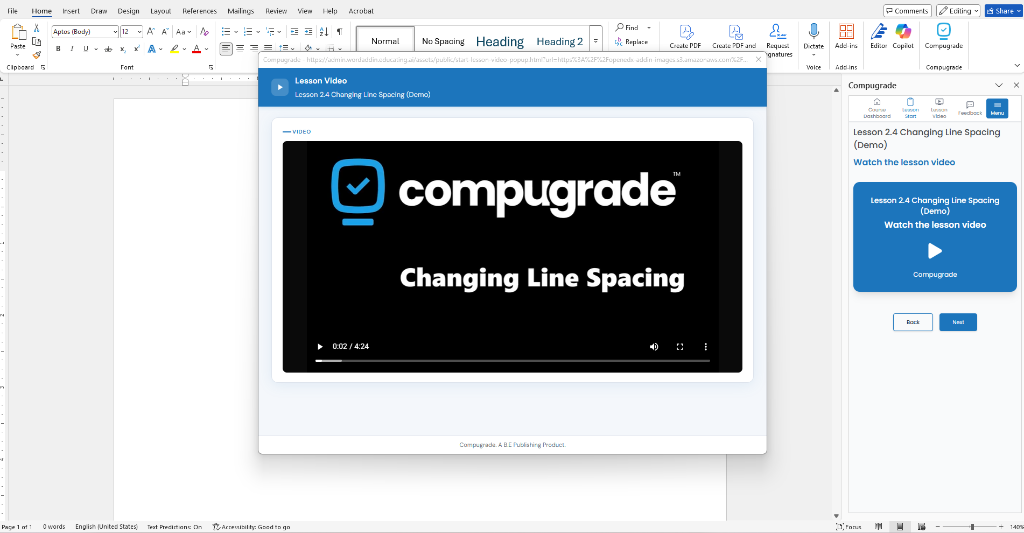
Every lesson includes a narrated video. Students are able to skip through the video to skill specific segments without searching.
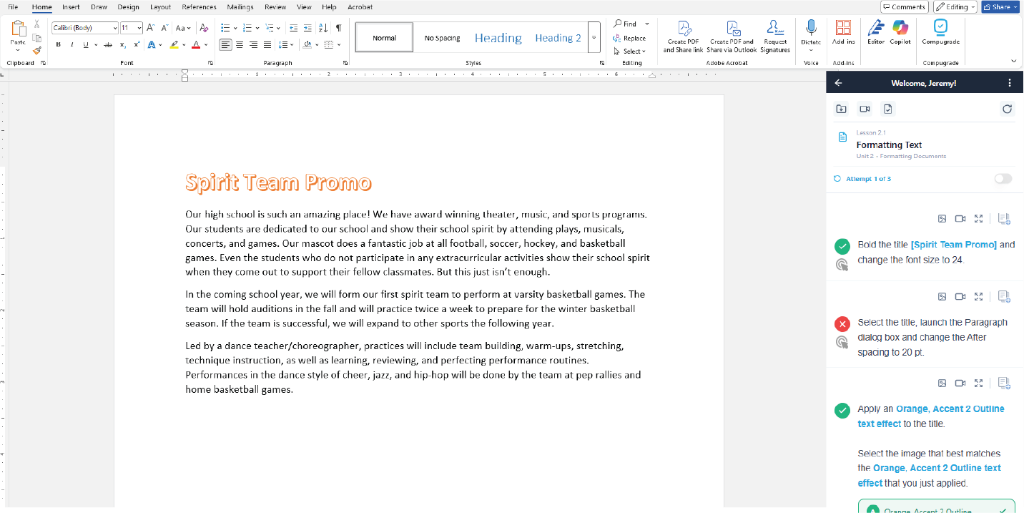
All content is pre-loaded on screen. All instructions are completed in real-time, with instant feedback, grading and optional lesson re-dos set by teachers.
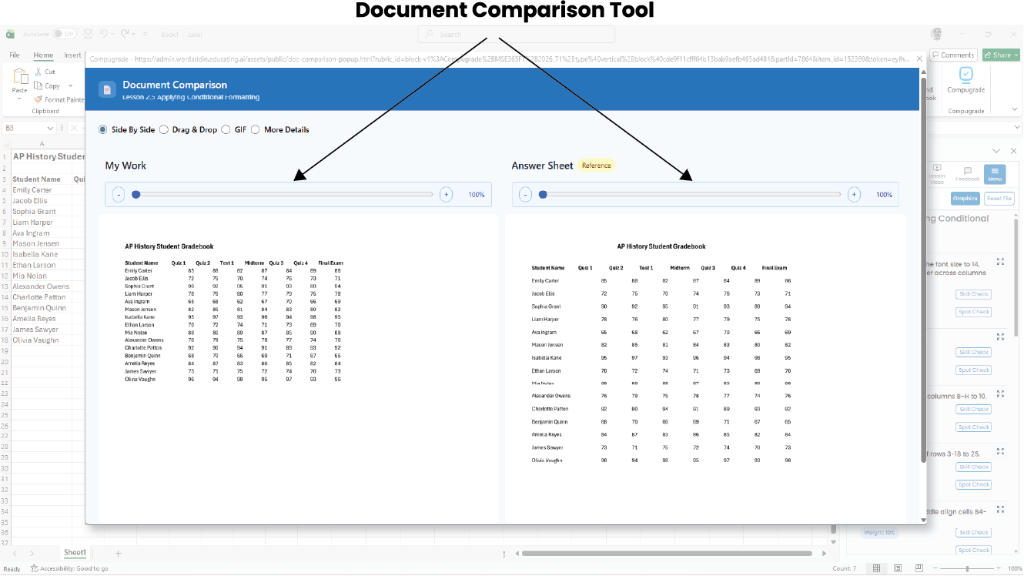
Student's compare their work to the Answer Key in real-time to "Spot Check" their progress on each lesson.
Students can compare and check their document in real-time against the lesson answer key with visual drag-and-drop comparison — so they see exactly what needs to be corrected before submitting.
Drag your document onto the Answer Key to compare
LiveAnswer Key
Student's Work
Return to the lesson to make necessary corrections.

The Computer Applications Teaching & Assessment Platform for Schools by B.E. Publishing.

A trusted educational publisher with over 30 years of providing resources for CTE educators.
© 2026 Compugrade. All rights reserved.